What it does best
Generates detailed and accurate images. Handles text rendering and multi object scenes better than earlier versions.

We are working on the new website and some things might not work yet. We will give you the report a problem option soon to report issues you are having.
Thank you,
Sup' AI team
DALL-E 3, developed by OpenAI, generates realistic and creative images from text prompts, included with ChatGPT Plus.
Generates detailed and accurate images. Handles text rendering and multi object scenes better than earlier versions.
Use it to illustrate blogs, marketing assets, product ideas and educational content.
Free with ChatGPT Plus image credits. Additional credits purchasable. API billed per image generated.
DALL·E (latest generation) is an image generator focused on instruction-following and clean compositions. You describe what you want in plain language—“draw a friendly robot reading in a café, vector style”—and it produces images that closely match your request. It is available through ChatGPT and the OpenAI Images API, with options for size, background, and simple edits. It works well for illustrations, icons, product mockups, and scenes where clarity and layout matter.
DALL·E is excellent at following directions. If you specify arrangement (“robot at left, window at right”), style (“flat vector, thick strokes”), and mood (“friendly, warm palette”), it tends to honor those constraints, returning tidy compositions with readable shapes. This makes it ideal for explainers, educational illustrations, icon sets, and simple product visuals where clarity beats drama. Text rendering within images is better than most generators, useful for posters or UI-like mockups—though for production typography you should still add text in a design tool.
Prompting is approachable. You can think like a brief: subject, setting, style, color notes, camera or perspective if relevant. Iteration is smooth through variations and re-generations; you can converge on a look quickly by changing one parameter at a time. For teams, repeatable phrasing (“flat vector, bold outlines, soft grain, 3-color palette”) yields consistent results across assets.
Use DALL·E whenever you need clear, communicative images fast. Upstream, it’s great for creating option boards: generate half a dozen takes on an idea, pick one, then refine. Midstream, you can replace stock art for common scenes (team collaboration, checklists, dashboards) with on-brand illustrations that feel less generic. Downstream, export PNGs with transparent backgrounds or fixed sizes and finish in Figma or Photoshop for text, layout, and color tweaks.
Through the Images API, developers can automate asset creation: generate thumbnails, illustrations for docs, or dynamic social images. Non-developers can work via ChatGPT’s image tools without touching code. Keep a library of approved prompts and color tokens so future requests stay consistent with your brand.
Highly realistic photography and complex typography still benefit from manual polish. Treat any in-image text as a placeholder and finalize typography in your design app. As with all AI tools, avoid sensitive or copyrighted material in prompts and references, and keep people or private data out of uploads. For strict brand colors or exact product geometry, plan to nudge hues and proportions during post. Finally, do not over-pack prompts—short, structured instructions outperform long, meandering ones. Think “subject + setting + style + palette,” then iterate in small steps.
DALL E 3 wins when briefs demand obedience to instructions, clear layout, readable text, and tidy compositions make it unusually effective for covers, diagrams, and UI like visuals. We do not like the hosted ceiling on automation and the occasional conservatism of safety filters; deeper API control would help serious pipelines. What we found interesting was how the ChatGPT pairing makes creative iteration conversational and keeps references, feedback, and edits in one thread. Security is typical of hosted generation, treat it as external processing and keep confidential artifacts out without a vetted enterprise setup. DALL E 3 is for teams that value instruction faithful concepting and surgical edits; it is not for batch automation or strict reproducibility. Strengths are prompt fidelity and editability; weaknesses are limited programmability and character continuity. Use it to nail the concept and composition, then finish typography and exports in design tools.
New accounts may receive limited trial credits; ongoing usage billed per image via OpenAI account.
Higher resolution options; background transparency; image edits and variations via API; priority capacity with paid tiers.
Each block is a copy-ready prompt.
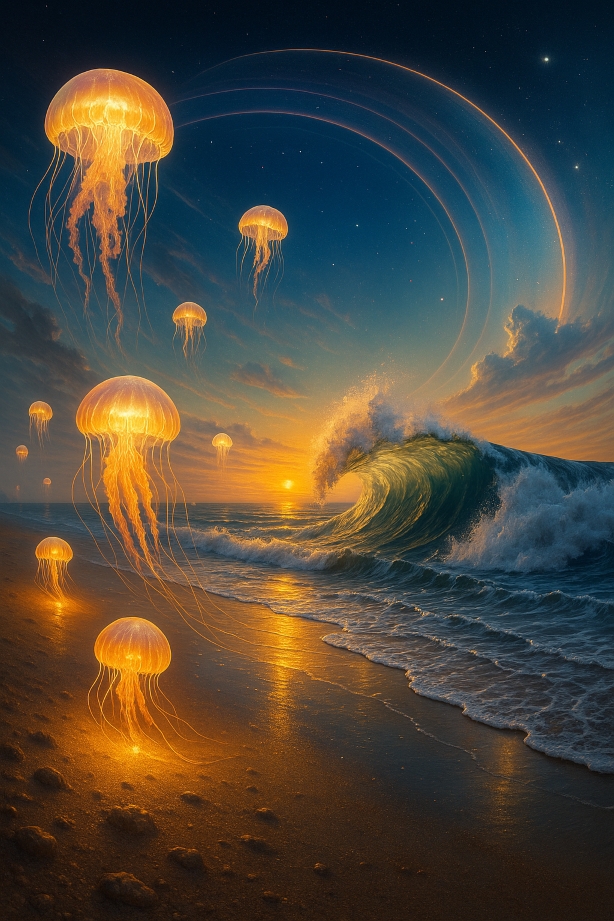
A hyper-realistic surreal beach at twilight, with glassy waves frozen mid-crash, glowing jellyfish floating above the sand, and the horizon bending upward into an arc. Ultra-detailed textures of sand, water reflections, and glowing skies. Cinematic and dreamlike atmosphere.
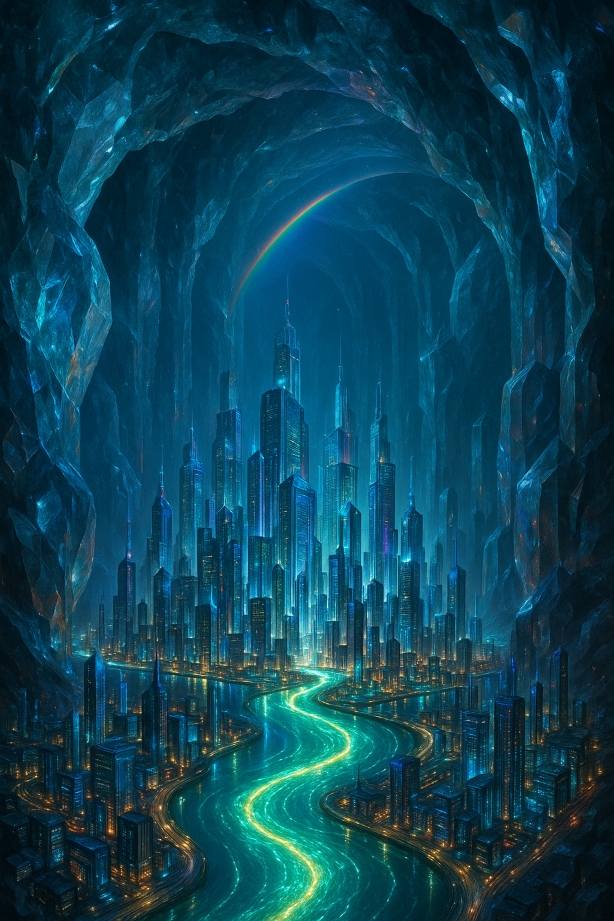
A futuristic city built inside a colossal crystal cavern, skyscrapers shimmering like gemstones, rivers of glowing liquid running through the streets, and rainbow beams refracting across the cavern ceiling. Hyper-realistic with surreal lighting and glass reflections.
Widely used across product, education, and marketing teams; strong tutorial ecosystem via OpenAI and third-party creators.
DALL·E is the most straightforward for precise, brief-driven illustrations. Midjourney is better for dramatic style; Stable Diffusion offers deepest local control and customization.
Transform your photos with AI magic
Pricing: Offers a free trial with in-app purchases for avatar packs and premium features. Subscription options are available. View → Updating logo
Generate, edit, and publish inside one subscription
Pricing: Subscription via Envato Elements. AI usage included with fair use; periodic promos may lift caps. View → Updating logo
Generate posters, ads, and visuals with accurate text placement
Pricing: Free tier with paid plans View →Effortlessly create professional product photos.
Pricing: Free basic features, with Pro subscription unlocking advanced tools and unlimited exports. View → Updating logo
AI-driven artistic image generator
Pricing: Paid (~$29.99/month or $399 lifetime) View → Updating logo
AI-powered creative image generator
Pricing: Free tier with daily token quota; API Basic $9 per month for 3,500 credits; Standard $49 per month; Pro $299 per month with priority processing and enterprise API access. View →AI-powered art generation from your photos.
Pricing: Free to try with basic features; paid plans offer higher resolutions and faster processing. View details →Transform your photos into stunning AI art.
Pricing: Offers a free trial, with subscription plans for unlimited Magic Avatar generations and advanced features. View details →Generate images with advanced AI
Pricing: Free and open-source, requiring only hardware resources for operation. View details →Last updated:
Search